
Create an account on a Crypto Exchange
(Skip this step if you already have one.)
Place your order through NextChems and choose Bitcoin (BTC) at checkout.
1. Open Cash App and Navigate to Bitcoin
Open Cash App and sign in.
On the home screen, tap the Money tab (bottom-left, dollar sign icon).
Select Bitcoin (BTC) to view your Bitcoin balance.
2. Select Withdraw Bitcoin
Tap Send (airplane icon) or the Withdraw option under your BTC balance.
Make sure BTC is selected (switch from USD to BTC if needed).
3. Enter the Amount
Enter how much Bitcoin you want to withdraw (in BTC or USD equivalent).
Review the estimated fees and total cost.
4. Scan the QR Code
Tap the QR scanner icon in the recipient field.
Open your external wallet and display its receive QR code.
Scan the QR code to automatically fill in the wallet address.
(If you can’t scan, you can paste the wallet address manually.)
5. Review and Confirm
Verify the wallet address (check the first and last few characters).
Confirm the amount, fees, and recipient wallet.
Complete authentication (PIN, Touch ID/Face ID, or 2FA).
6. Complete the Withdrawal
Tap Confirm to send.
The transaction will process on the Bitcoin network, usually within 10–60 minutes depending on congestion.
You can track progress under Activity > Bitcoin in Cash App.
Minimum Withdrawal: Usually around 0.00001 BTC (about $1), but check your app for current limits.
Security: Only scan QR codes from trusted wallets. Never share your private keys or seed phrase.
Taxes: Bitcoin transactions may have tax implications. Consider consulting a tax professional.
Troubleshooting: If QR scanning fails, improve lighting or use manual entry. For other issues, contact Cash App support through the app.
Converting to Cash: If you want to withdraw USD instead of BTC, first sell your Bitcoin in the app, then transfer the USD to your linked bank account.
For the most accurate and updated information, visit Cash App’s official help center.
For customers in the United States, we recommend these trusted options:
Binance US
Cash App (Highly Recommended)
If you’re located outside the US, you can explore additional verified exchanges based on your country and payment method at: BuyBitcoinWorldwide.com
Highly Recommended. If you’re based in the US, Cash App is the quickest and most convenient way to buy Bitcoin for your NextChems order.
Verification is fast — simply use your Driver’s License or a valid ID.
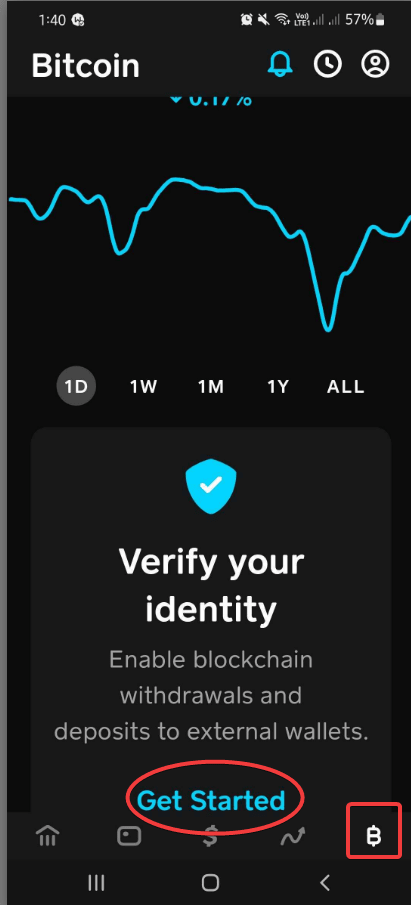
Cash App is one of the most trusted and widely used platforms for buying Bitcoin online. It’s perfect for quick purchases and secure payments.
For faster ID verification, use your Driver’s License.
Select Bitcoin, then tap Verify Your Identity.
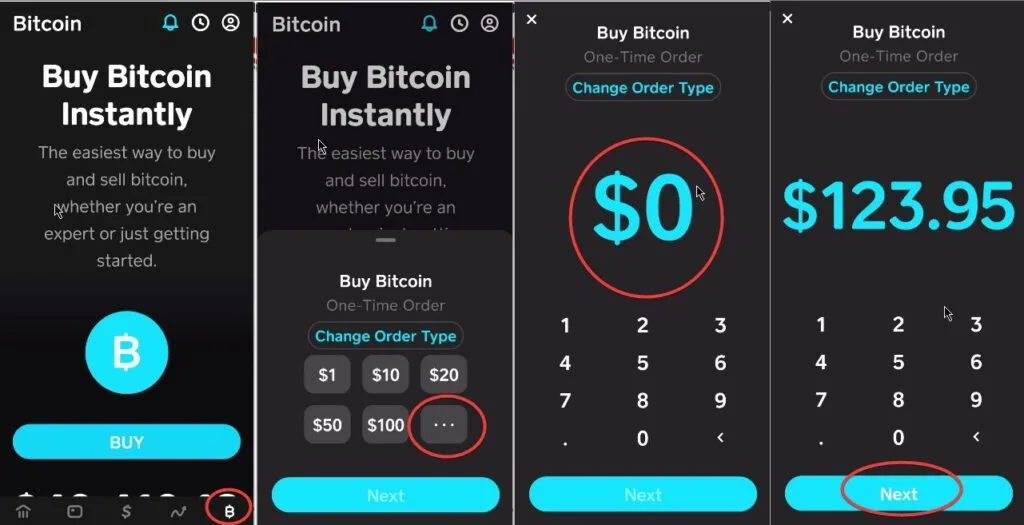
Once verified, go to the Bitcoin tab and purchase Bitcoin equal to your order total, adding a few extra dollars (around $2–$5) to cover network fees.
You can withdraw Bitcoin from Cash App to any wallet:
Tap USD to switch to BTC on your home screen.
Select Bitcoin → Send.
Enter or scan your wallet address.
Choose a withdrawal speed, then Confirm & Send.
Minimum withdrawal: 0.001 BTC (standard) or 0.00005 BTC (priority). Once verified, you can use your Bitcoin to place your NextChems order.
Select Bitcoin (BTC or XBT) — not Bitcoin Cash (BCH), as it’s a different currency.
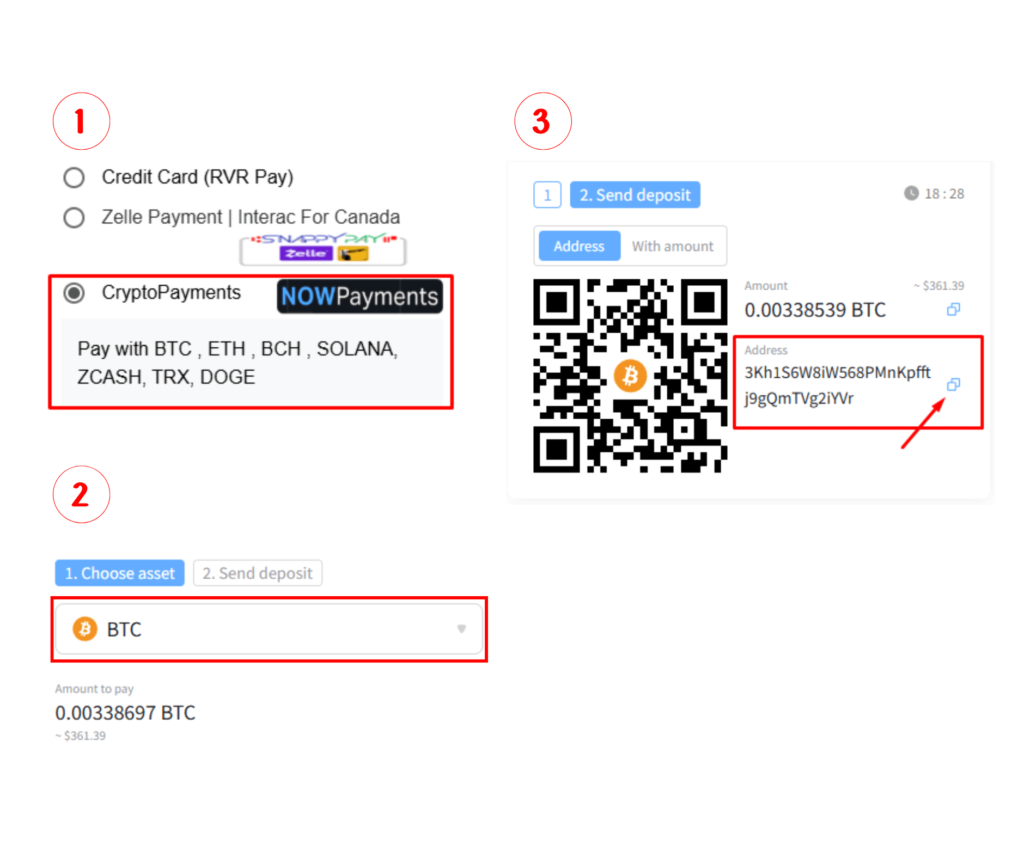
Do not use the sample wallet address shown on the site. Each order has a unique wallet address, and sending to the wrong one will result in permanent loss of funds.
Copy (don’t scan) the alphanumeric wallet address displayed on your order page.
In your Cash App, select BTC, then withdraw the exact payment amount to the provided wallet address.
Wait for blockchain confirmation — this usually takes around 30 minutes.
Optional: To verify your transaction, visit blockchain.com and paste your wallet address to check its status.
Create a wallet and securely write down your recovery phrases, then buy Bitcoin with your credit card (minimum $50) to proceed with payment.

The easiest way for Canadians to buy and sell Bitcoin — purchase in minutes with Interac e-Transfer®, cash out instantly to your bank, and enjoy caring customer support.

One of the fastest and easiest cryptocurrency providers — withdrawal fee is $5 USD, network fees apply when sending BTC (also known as XBT).

Do not download Kraken Pro: Advanced Bitcoin & Crypto Trading, as it’s meant for traders and requires an API to log in. Instead, buy Bitcoin using the regular Kraken app and include a small network fee (usually around $2 USD).
Create a wallet and securely write down your recovery phrases, then buy Bitcoin with your credit card (minimum $50) to proceed with payment.
The easiest way for Canadians to buy and sell Bitcoin — purchase in minutes with Interac e-Transfer®, cash out instantly to your bank, and enjoy caring customer support.
One of the fastest and easiest cryptocurrency providers — withdrawal fee is $5 USD, network fees apply when sending BTC (also known as XBT).
Do not download Kraken Pro: Advanced Bitcoin & Crypto Trading, as it’s meant for traders and requires an API to log in. Instead, buy Bitcoin using the regular Kraken app and include a small network fee (usually around $2 USD).